<?xml version="1.0" encoding="UTF-8"?>
<feed xmlns="http://www.w3.org/2005/Atom" xml:lang="">
                        <id>https://rbsoft.support-hub.io/feed/355</id>
                                <link href="https://rbsoft.support-hub.io/feed/355" rel="self"></link>
                                <title><![CDATA[SMS Gateway Article Feed]]></title>
                    
                                <subtitle></subtitle>
                                                    <updated>2026-03-14T05:46:55+00:00</updated>
                        <entry>
            <title><![CDATA[How to resolve INVALID_SENDER error while logging in to SMS Gateway app?]]></title>
            <link rel="alternate" href="https://rbsoft.support-hub.io/articles/how-to-resolve-invalid-sender-error-while-logging-in-to-sms-gateway-app" />
            <id>https://rbsoft.support-hub.io/137</id>
            <author>
                <name><![CDATA[Ravi Patel]]></name>
            </author>
            <summary type="html">
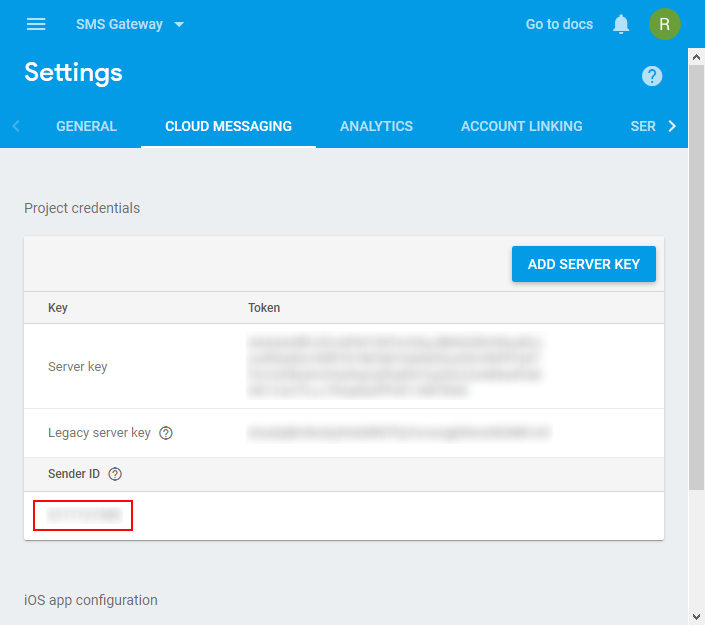
                <![CDATA[<p>This usually means you used wrong Firebase Sender ID while installing SMS Gateway on your server. You can get correct Firebase Sender ID by following <a href="https://smsgateway.rbsoft.org/docs/getting_server_key_and_sender_id_from_firebase.htm" target="_blank" rel="noreferrer noopener">this</a> tutorial.</p><p><img src="https://support-hub--assets.s3.eu-west-2.amazonaws.com/assets/150/images/Ip1osqw2I2jGEcJtesisvZaImKhqD5WeEETqtRu5.png" alt="Ip1osqw2I2jGEcJtesisvZaImKhqD5WeEETqtRu5.png" style="width:100%;" /><br /></p><p>
</p><p>After you get the correct Firebase Sender ID you can correct it in config.php and it should start working.</p>]]>
            </summary>
                                    <updated>2019-03-09T05:31:16+00:00</updated>
        </entry>
            <entry>
            <title><![CDATA[Why my messages are stuck in Pending status?]]></title>
            <link rel="alternate" href="https://rbsoft.support-hub.io/articles/why-my-messages-are-stuck-in-pending-status" />
            <id>https://rbsoft.support-hub.io/138</id>
            <author>
                <name><![CDATA[Ravi Patel]]></name>
            </author>
            <summary type="html">
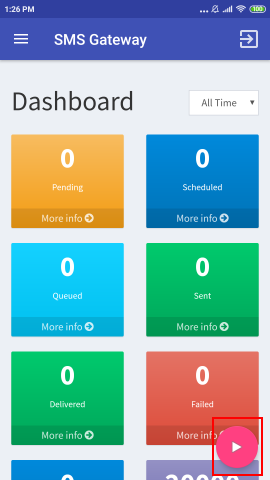
                <![CDATA[<h2>Enable Alternative Service</h2><p>You can try to enable the alternative service if your messages are staying in "Pending" status for a long time. You just have to open the app and click on the Play button to start the service as highlighted in the below screenshot.</p><p>                                                                              <img src="https://support-hub--assets.s3.eu-west-2.amazonaws.com/assets/150/images/fk8lUqI06tIYw5Zrz6yO0NFLWzJEKYWOr435n6or.png" style="float:none;width:25%;" alt="fk8lUqI06tIYw5Zrz6yO0NFLWzJEKYWOr435n6or.png" /><br /></p><p>It is still a good idea to follow the below instructions.</p><h2>
Note for phones without Stock Android</h2><p><br /></p><h3>Devices with custom Battery Saver</h3><p>Some device manufacturers like Xiaomi, Honor, Oppo, Realme and some others use their own battery saver app. You will need to add the SMS Gateway app into the exceptions list in the battery saver app if your phone is using a custom battery saver. For example, you can see how I added the SMS Gateway app into exceptions list on Redmi Note 3.</p><p><iframe src="//www.youtube.com/embed/EAbFd0QPhFI" class="note-video-clip"></iframe><br /></p><h2>AutoStart Permission</h2><p>If you are using a device that doesn't have the stock Android, then it may have AutoStart permission settings. You need to download the latest version of the app from <a href="https://rbsoft.org/downloads/sms-gateway/sms-gateway.apk" target="_blank" rel="noreferrer noopener">here</a>. If after installing, it prompts you with the message "Your device is restricting the application's functionality. Please enable/add the application in the whitelist, so it can work normally." then it means it is restricting the app. Just press the OK button, and it will take you to the screen where you can whitelist your app.</p><p>There is a chance that the latest version of the app can't detect the AutoStart permission, because it is not possible to test the app on every device. In that case, you should consult your device manufacturer to see if there is any setting like that available on your device.</p><h2>Important Note<br /></h2><p>If you don't see the above settings on your phone, then you can check out the following site. It lists all restrictive functionality available on commonly used devices. Just whitelist the App or disable any restrictive functionality, and it should work normally.</p><p><a href="https://dontkillmyapp.com?app=SMS%20Gateway" target="_blank" rel="noreferrer noopener">https://dontkillmyapp.com/</a></p><h4>Recommended steps if it still doesn't work</h4><p>Even after following the above instructions, if you still encounter the issue, then you need to try the app on a different device. It is recommended that you use a Stock Android device for the best experience. It is also preferable to use a device with 4 GB or more RAM for the best experience.</p>]]>
            </summary>
                                    <updated>2024-05-07T10:28:09+00:00</updated>
        </entry>
            <entry>
            <title><![CDATA[Why my messages are stuck in Queued status?]]></title>
            <link rel="alternate" href="https://rbsoft.support-hub.io/articles/why-my-messages-are-stuck-in-queued-status" />
            <id>https://rbsoft.support-hub.io/139</id>
            <author>
                <name><![CDATA[Ravi Patel]]></name>
            </author>
            <summary type="html">
                <![CDATA[<p>It can happen if you are sending messages too fast. Try the configuration shown <a href="https://support.rbsoft.org/articles/idle-delay-for-smooth-operation-of-the-app-2610" target="_blank" rel="noreferrer noopener">here</a>.<br /></p><p>Some device manufacturers also set the limit on number of messages you can send in certain time span. If you are getting error "SMS Gateway is sending the large number of messages." then follow below guide to prevent it or set the minimum delay above 60 sec to avoid this issue.</p><p><a href="https://support.rbsoft.org/articles/im-getting-the-frequent-prompt-with-message-sms-gateway-is-sending-large-number-of-messages-do-you-want-to-allow-this-app-to-continue-sending-messages-how-can-i-stop-it" target="_blank" rel="noreferrer noopener">https://support.rbsoft.org/articles/im-getting-the-frequent-prompt-with-message-sms-gateway-is-sending-large-number-of-messages-do-you-want-to-allow-this-app-to-continue-sending-messages-how-can-i-stop-it</a><a href="https://support.rbsoft.org/articles/im-getting-the-frequent-prompt-with-message-sms-gateway-is-sending-large-number-of-messages-do-you-want-to-allow-this-app-to-continue-sending-messages-how-can-i-stop-it" target="_blank" rel="noreferrer noopener"></a></p><p>This can also happen due to SIM blocks. In that case, you can follow <a href="https://support.rbsoft.org/articles/how-can-i-prevent-sim-block-from-your-carrier-2699" target="_blank" rel="noreferrer noopener">this guide</a>.<br /></p><p>If you are trying to send MMS, then make sure SMS Gateway app is the default app for SMS. If it isn't, you can set it as default by following the below guide.<br /><br /><a href="https://support.rbsoft.org/articles/how-to-prevent-default-messaging-app-from-storing-every-message-i-send-1948" target="_blank" rel="noreferrer noopener">https://support.rbsoft.org/articles/how-to-prevent-default-messaging-app-from-storing-every-message-i-send-1948</a></p><p>This can also happen if you don't have a sufficient balance on your phone to send SMS or MMS. </p><p></p><p>It can also happen if the app is unable to report the status to the server because of connection failure. In this case, App will do it after some time.<br /></p><h2>Problems with Older Color OS devices</h2><p>If you are using older Oppo or Realme devices, then the app will prompt you every time you send the message. So it is not preferable to use older Oppo or Realme devices to use this app.</p>]]>
            </summary>
                                    <updated>2023-09-19T10:46:56+00:00</updated>
        </entry>
            <entry>
            <title><![CDATA[Do I get charged for sending SMS if I use this app?]]></title>
            <link rel="alternate" href="https://rbsoft.support-hub.io/articles/do-i-get-charged-for-sending-sms-if-i-use-this-app" />
            <id>https://rbsoft.support-hub.io/140</id>
            <author>
                <name><![CDATA[Ravi Patel]]></name>
            </author>
            <summary type="html">
                <![CDATA[<p>This app uses your Android device to send SMS so usual SMS charges will be charged when you send messages using this app.</p>]]>
            </summary>
                                    <updated>2018-12-05T10:12:57+00:00</updated>
        </entry>
            <entry>
            <title><![CDATA[I am getting 500 error while trying to install this app on my server?]]></title>
            <link rel="alternate" href="https://rbsoft.support-hub.io/articles/i-am-getting-500-error-while-trying-to-install-this-app-on-my-server" />
            <id>https://rbsoft.support-hub.io/141</id>
            <author>
                <name><![CDATA[Ravi Patel]]></name>
            </author>
            <summary type="html">
                <![CDATA[<p>This can happen due to a permissions issue. Make sure all the PHP files have 644 permission and all the folders have 755 permission.</p><p>Also, If you are getting 500 error while exporting or importing Excel file then make sure your server meets following requirements.</p><ul><li>PHP extension php_zip enabled</li><li>PHP extension php_xml enabled </li><li>PHP extension php_gd2 enabled (if not compiled in)</li><li>PHP extension php_mbstring enabled</li></ul>]]>
            </summary>
                                    <updated>2018-12-05T10:19:58+00:00</updated>
        </entry>
            <entry>
            <title><![CDATA[How can I receive messages in Admin Panel?]]></title>
            <link rel="alternate" href="https://rbsoft.support-hub.io/articles/how-can-i-receive-messages-directly-in-admin-panel" />
            <id>https://rbsoft.support-hub.io/142</id>
            <author>
                <name><![CDATA[Ravi Patel]]></name>
            </author>
            <summary type="html">
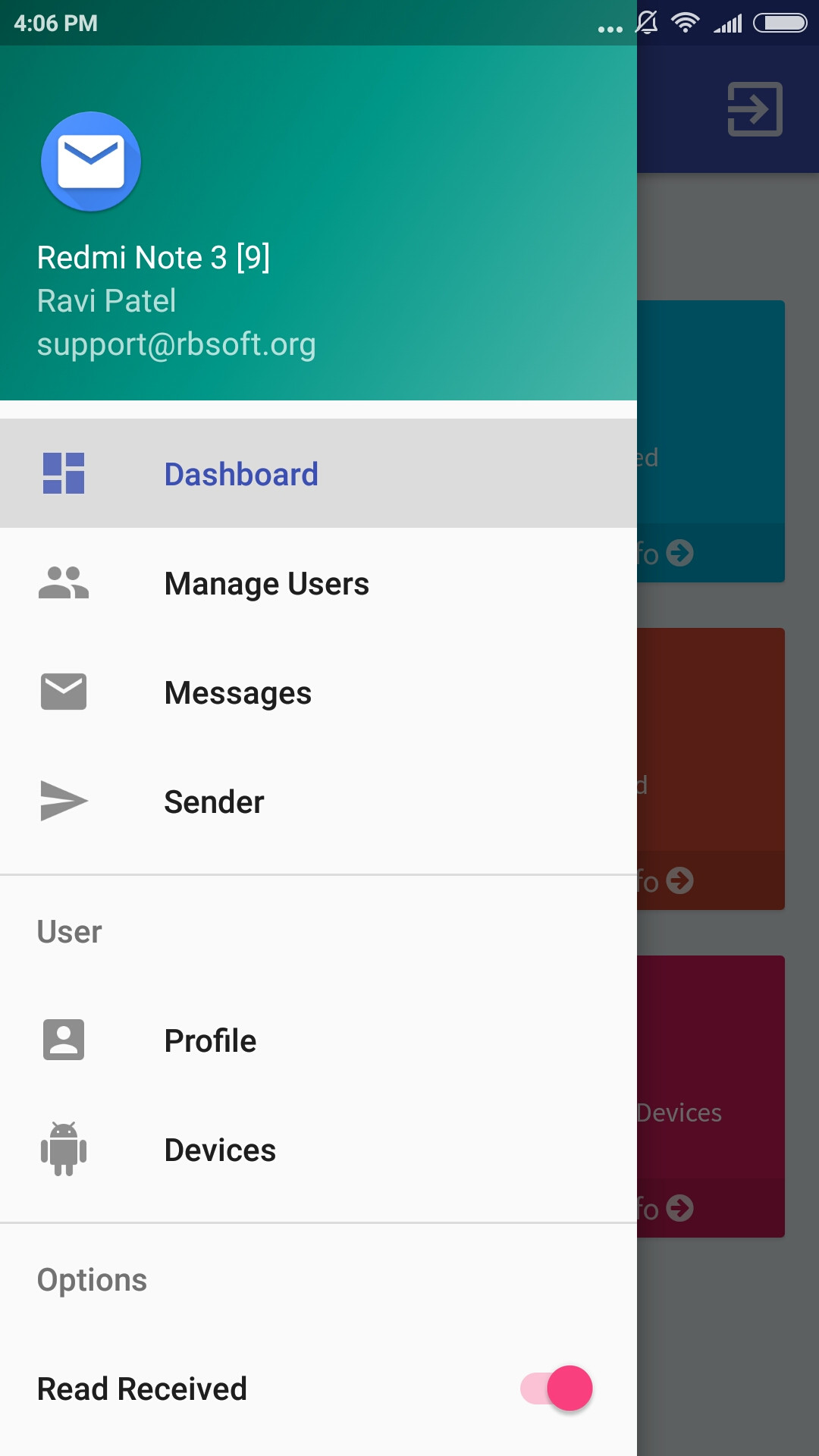
                <![CDATA[<p>You can turn on Read Received option from Navigation Drawer inside SMS Gateway app on your Android device as shown in the following screenshot. All the messages you receive after this will be synced to Admin Panel.</p><p><img src="https://support-hub--assets.s3.eu-west-2.amazonaws.com/assets/150/images/1KP7GryUdibmvtwZqtr5TPOoJrPPjRBR585DFsdQ.jpeg" style="width:100%;" alt="1KP7GryUdibmvtwZqtr5TPOoJrPPjRBR585DFsdQ.jpeg" /></p><p><br /></p>]]>
            </summary>
                                    <updated>2018-12-05T11:01:01+00:00</updated>
        </entry>
            <entry>
            <title><![CDATA[How the received message WebHook works?]]></title>
            <link rel="alternate" href="https://rbsoft.support-hub.io/articles/how-the-received-message-webhook-works" />
            <id>https://rbsoft.support-hub.io/143</id>
            <author>
                <name><![CDATA[Ravi Patel]]></name>
            </author>
            <summary type="html">
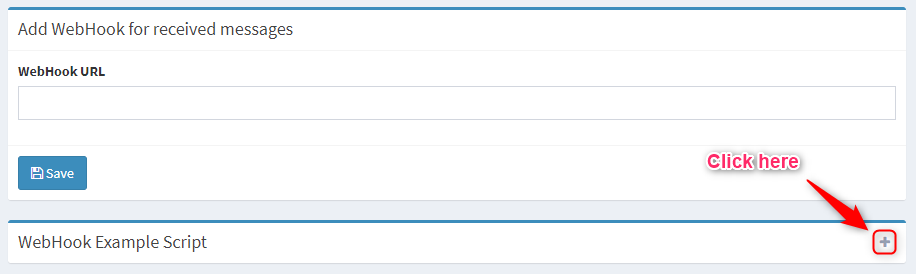
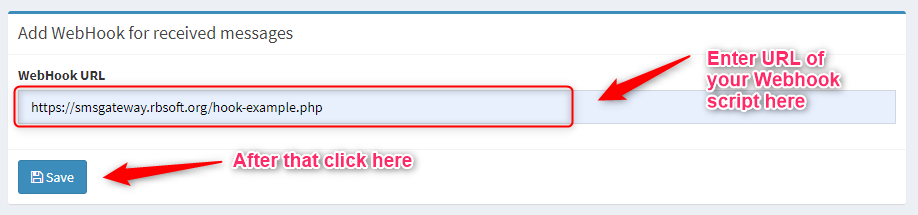
                <![CDATA[<p>The first thing you need to do is turn on 'Read Received' from the navigation drawer. You can do it by following <a href="https://rbsoft.support-hub.io/articles/how-can-i-receive-messages-directly-in-admin-panel" target="_blank" rel="noreferrer noopener">this guide</a>.</p><p>You need to create a script as suggested in the WebHook Example Script section of the <a href="https://smsgateway.rbsoft.org/api.php" target="_blank" rel="noreferrer noopener">API</a> page in your Admin Panel and upload it to your server. Just provide its URL in Add WebHook form on the API page and hit the Save button. Now, whenever you will receive a message on your device that script will be executed automatically.</p><p>Remember, you can't execute the WebHook script directly. It won't work.</p><p>Here is a detailed example of how to add it.</p><p>[1] Login to your Admin Panel and open the API page. You will section called "Webhook Example Script" as shown in the screenshot below.</p><p><img src="https://support-hub--assets.s3.eu-west-2.amazonaws.com/assets/150/images/Pg8zVKcUmYZP9gV9UbGvgmnIpddIzgusiCrTEYz2.png" alt="Pg8zVKcUmYZP9gV9UbGvgmnIpddIzgusiCrTEYz2.png" /></p><p>[2] Just copy all the text inside this section. Now create a PHP file named "hook-example.php" at the root of your server, and paste all the text you copied from that section into this file.</p><p>[3] Now to make it work you have to add the URL of the file we created. Just login to your Admin Panel and open your API page. You will see a section called "Add Webhook for received messages". Just enter the URL for the "hook-example.php" into the form and press save as shown below. It is recommended to provide a secure URL (starts with https://) if your server URL is also a secure URL.</p><p><img src="https://support-hub--assets.s3.eu-west-2.amazonaws.com/assets/150/images/6qOV53UI79EovTKIHyewS18OqeMQM1hBnD8ZUKVc.png" alt="6qOV53UI79EovTKIHyewS18OqeMQM1hBnD8ZUKVc.png" /></p><p>[4] Now you have to turn on the "Read Received" from the mobile app as shown <a href="https://rbsoft.support-hub.io/articles/how-can-i-receive-messages-directly-in-admin-panel" target="_blank" rel="noreferrer noopener">here</a> if you haven't done so.</p><p>Now, Whenever you receive the message on your device which is registered to the SMS Gateway account where you added this webhook, the webhook script will be called automatically.</p>]]>
            </summary>
                                    <updated>2021-08-13T09:56:51+00:00</updated>
        </entry>
            <entry>
            <title><![CDATA[Does this application checks for message delivery?]]></title>
            <link rel="alternate" href="https://rbsoft.support-hub.io/articles/does-this-application-checks-for-message-delivery" />
            <id>https://rbsoft.support-hub.io/190</id>
            <author>
                <name><![CDATA[Ravi Patel]]></name>
            </author>
            <summary type="html">
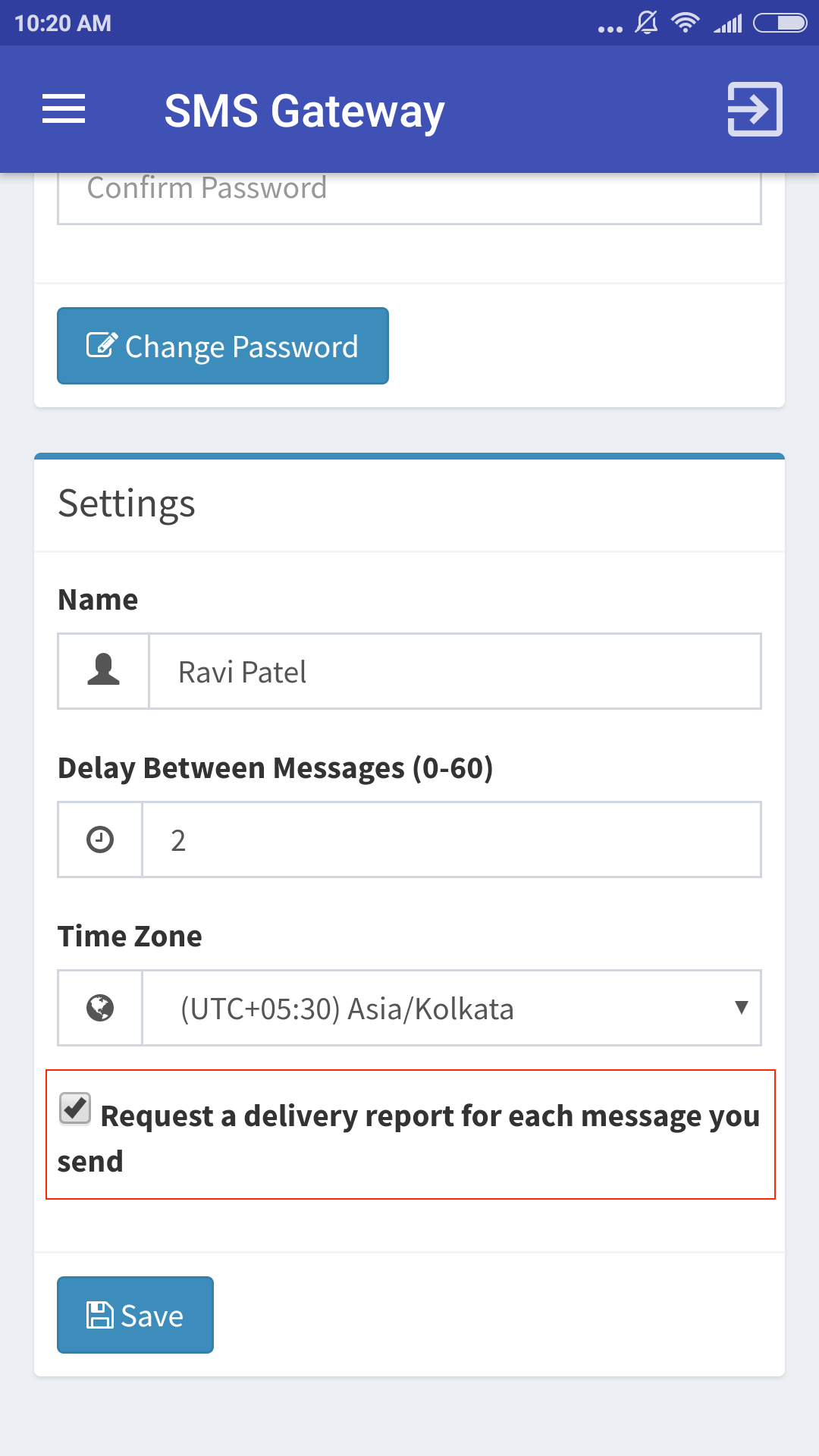
                <![CDATA[<p>Yes, This application requests a delivery report for every message you send when you turn on "Request a delivery report for each message you send" as shown in the below screenshot. This change will be effective next time you send the messages.</p><p><br /></p><p><img src="https://support-hub--assets.s3.eu-west-2.amazonaws.com/assets/150/images/0BgPYH8YAYrhnNRwMGuwlYbltD6nJS0w9jK9sWR6.png" alt="0BgPYH8YAYrhnNRwMGuwlYbltD6nJS0w9jK9sWR6.png" style="width:50%;" /><br /></p>]]>
            </summary>
                                    <updated>2019-10-25T05:47:06+00:00</updated>
        </entry>
            <entry>
            <title><![CDATA[Why SMS Gateway app is not available through Play Store anymore?]]></title>
            <link rel="alternate" href="https://rbsoft.support-hub.io/articles/why-sms-gateway-app-is-not-available-through-play-store-anymore" />
            <id>https://rbsoft.support-hub.io/351</id>
            <author>
                <name><![CDATA[Ravi Patel]]></name>
            </author>
            <summary type="html">
                <![CDATA[<p>There was a policy change from Google for all apps requiring SMS related permissions as you can see from <a href="https://support.google.com/googleplay/android-developer/answer/9047303" target="_blank" rel="noreferrer noopener">here</a>.</p><p>
</p><p>I submitted the app for a review many times but they rejected it every time. I also tried submitting it with the instructional video featuring a demo page completely integrated with the app but they rejected the app without even looking at the demo.</p><p>This doesn't mean that the app will stop working. The app will work normally but it won't be available via Play Store anymore.</p><p>
</p><p>Unfortunately, This is out of my hand. I will provide update notifications through CodeCanyon. You can get the latest version of the app from <a href="https://rbsoft.org/downloads/sms-gateway/sms-gateway.apk" target="_blank" rel="noreferrer noopener">here</a>.</p><p>
</p><p>If you don't know how to sideload apps then you can follow <a href="https://android.gadgethacks.com/how-to/android-basics-enable-unknown-sources-sideload-apps-0161947/" target="_blank" rel="noreferrer noopener">this guide</a> to install the APK file.</p><p>If you have any questions then you can <a href="https://support.google.com/googleplay/answer/7100415" target="_blank" rel="noreferrer noopener">contact Google Play support</a>.</p>]]>
            </summary>
                                    <updated>2019-03-22T05:50:36+00:00</updated>
        </entry>
            <entry>
            <title><![CDATA[Why I am getting "409 Conflict" when trying to login to SMS Gateway app on Android or while using the API?]]></title>
            <link rel="alternate" href="https://rbsoft.support-hub.io/articles/why-i-am-getting-409-conflict-when-trying-to-login-to-sms-gateway-app-on-android" />
            <id>https://rbsoft.support-hub.io/370</id>
            <author>
                <name><![CDATA[Ravi Patel]]></name>
            </author>
            <summary type="html">
                <![CDATA[<p>This error usually happens due to server blocking the app or misconfiguration by the host. Unfortunately, the Only way to resolve this error is to change your hosting. We used to host the demo server on Namecheap Stellar Plan, and it worked fine on it.</p><p><a href="https://namecheap.pxf.io/7mgnQ5" target="_blank" rel="noreferrer noopener">https://namecheap.pxf.io/7mgnQ5</a></p><p><br /></p>]]>
            </summary>
                                    <updated>2024-09-15T05:40:50+00:00</updated>
        </entry>
            <entry>
            <title><![CDATA[I can't login to SMS Gateway web panel after installing it. What should I do?]]></title>
            <link rel="alternate" href="https://rbsoft.support-hub.io/articles/i-cant-login-to-sms-gateway-web-panel-after-installing-it-what-should-i-do" />
            <id>https://rbsoft.support-hub.io/429</id>
            <author>
                <name><![CDATA[Ravi Patel]]></name>
            </author>
            <summary type="html">
                <![CDATA[<p>This usually happens when the application is unable to remove the 'install' folder after the installation finishes. You must remove the 'install' folder to login into the web panel.</p><p>If you still having problems with login. You can try the alternate session file. Just remove the "includes/session.php" and rename "includes/session-alt.php" to "session.php". Now it should use the default file-based sessions.</p>]]>
            </summary>
                                    <updated>2019-12-25T08:42:55+00:00</updated>
        </entry>
            <entry>
            <title><![CDATA[I'm getting the frequent prompt with message "SMS Gateway is sending large number of messages.". How can I stop it?]]></title>
            <link rel="alternate" href="https://rbsoft.support-hub.io/articles/im-getting-the-frequent-prompt-with-message-sms-gateway-is-sending-large-number-of-messages-do-you-want-to-allow-this-app-to-continue-sending-messages-how-can-i-stop-it" />
            <id>https://rbsoft.support-hub.io/472</id>
            <author>
                <name><![CDATA[Ravi Patel]]></name>
            </author>
            <summary type="html">
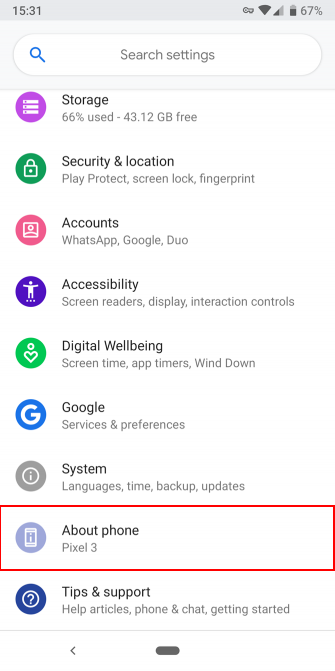
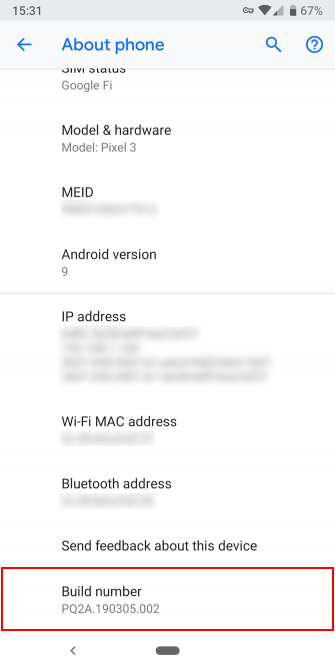
                <![CDATA[<p>By default, Some device manufacturers will check to make sure you haven’t sent more than 30 SMS messages to anyone within a span of 30 minutes. However, we can manually change both of these values (the number of messages and the time frame) so that we aren’t bothered by the Device’s default SMS limit restrictions.</p><p>First thing you need to do is Turn on the USB Debugging on your Android device.</p><p>On modern Android devices, you’ll find USB Debugging in the Developer Options menu, which is hidden by default.
</p><p>To unlock it, head to Settings and scroll down to About phone. Scroll down again, and you’ll see a Build number entry at the bottom. Tap this several times, and you’ll see a notification letting you know that you’re now a developer.</p><div class="row">
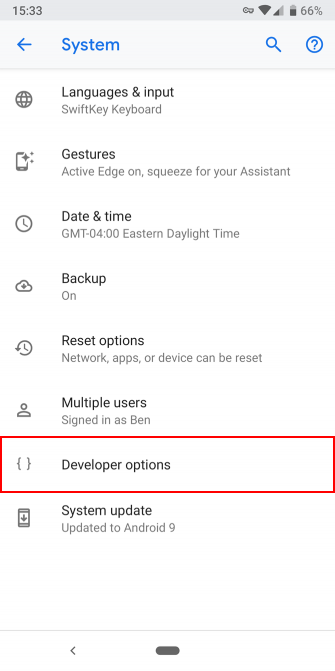
<div class="col"><img src="https://support-hub--assets.s3.eu-west-2.amazonaws.com/assets/150/images/IVvgLU2aCpJl55ElMZBnOFz0W3GbAOHcOEw1weFw.png" alt="IVvgLU2aCpJl55ElMZBnOFz0W3GbAOHcOEw1weFw.png" /></div><div class="col"><img src="https://support-hub--assets.s3.eu-west-2.amazonaws.com/assets/150/images/VMjANyufjPV7Udvq6HxwRssR6XK1JOHv2Ma3XHxT.png" alt="VMjANyufjPV7Udvq6HxwRssR6XK1JOHv2Ma3XHxT.png" /></div></div><p>Now jump back to Settings and scroll back down to the bottom where you accessed About phone. On Android Pie and later, you’ll need to open the System entry and expand the Advanced section. Here you’ll see a new entry titled Developer options. On older versions of Android, you’ll see the Developer options entry listed next to About phone instead.
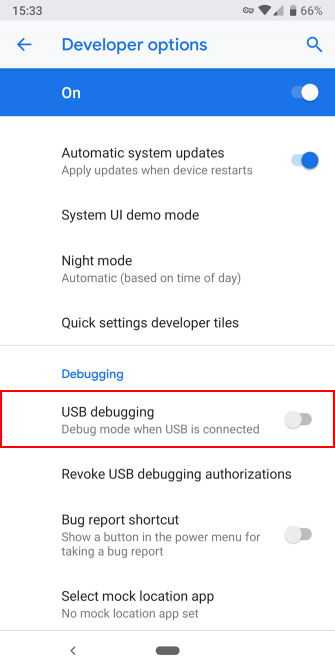
</p><p>Regardless, once you’re inside, look for USB debugging under the Debugging header. Hit the slider to enable it, and confirm Android’s warning that you understand what this feature is for. If your device also have the option called "Disable permission monitoring" in Developer options, then you have to enable it to make this work.<br /></p><div class="row">
<div class="col">
<img src="https://support-hub--assets.s3.eu-west-2.amazonaws.com/assets/150/images/ryKijeD7iROhYpWloglV2iaUbAfjYG48HvrP62FD.png" alt="ryKijeD7iROhYpWloglV2iaUbAfjYG48HvrP62FD.png" /></div><div class="col"><img src="https://support-hub--assets.s3.eu-west-2.amazonaws.com/assets/150/images/jvxQezYWEHSVNpj2a8dPdiubsbWaySrcZyhPX6jp.png" alt="jvxQezYWEHSVNpj2a8dPdiubsbWaySrcZyhPX6jp.png" /></div></div><p>You may need to install ADB driver from <a href="http://download.clockworkmod.com/test/UniversalAdbDriverSetup.msi">here</a> before connecting your phone.</p><p>Now you’ve turned on USB Debugging. To use it, you just need to plug your phone into a PC using a USB cable. When you do this, you’ll see a prompt on your phone asking if you want to authorize USB Debugging for that specific computer. This is a security feature designed to keep your device safe from attack, so make sure you trust the computer before accepting this.</p><p>Now download the zip file from <a href="https://rbsoft.org/downloads/sms-gateway/increase-sms-limit.zip">here</a> and extract it anywhere on your Windows PC. After extracting it, open the "increase-sms-limit" folder and double-click on "increase-sms-limit.bat". It should set your Android device SMS limit high enough to avoid the prompt.</p><p>This method is not guaranteed to work on every device. If it doesn't work, then there is nothing you can do about it.</p>]]>
            </summary>
                                    <updated>2022-08-20T10:50:03+00:00</updated>
        </entry>
            <entry>
            <title><![CDATA[There are high number of failed messages when I try to send messages in bulk. What should I do?]]></title>
            <link rel="alternate" href="https://rbsoft.support-hub.io/articles/there-are-high-number-of-failed-messages-when-i-try-to-send-messages-in-bulk-what-should-i-do" />
            <id>https://rbsoft.support-hub.io/478</id>
            <author>
                <name><![CDATA[Ravi Patel]]></name>
            </author>
            <summary type="html">
                <![CDATA[<p>You may get a high failure rate while sending messages if you are trying to send them too fast. You can try to configure the app as shown <a href="https://support.rbsoft.org/articles/idle-delay-for-smooth-operation-of-the-app-2610" target="_blank" rel="noreferrer noopener">here</a> to decrease the number of failed messages. </p><p>If you are sending MMS messages, then make sure SMS Gateway is set as default app for sending SMS. If it isn't, then you can set it as default by following the below guide.</p><p><a href="https://support.rbsoft.org/articles/how-to-prevent-default-messaging-app-from-storing-every-message-i-send-1948" target="_blank" rel="noreferrer noopener">https://support.rbsoft.org/articles/how-to-prevent-default-messaging-app-from-storing-every-message-i-send-1948</a><br /></p><p>Some countries have different rules for mobile number formatting while sending messages. The badly formatted mobile number is also one of the reasons for failed response. You can check out the guide from <a href="https://smsgateway.rbsoft.org/docs/formatting_phone_numbers.htm" target="_blank" rel="noreferrer noopener">here</a> to see how to format mobile numbers while sending messages.</p><p>Sometimes operators can ban your SIM for sending too many messages, or they can have a rate limit on the number of messages you can send in a certain time frame. In this case, using higher delay between messages can prevent failures.<br /></p><p>Every network operator works differently, and a "Failed" response is given by the network operator. It usually happens when your network operator can't reach the mobile number. You can try changing the sim card or using the same sim on another device. </p><p>There is nothing you can do about it if you are still getting a failed response from the network operator after trying all the instructions provided above. You can check out the error code list shown below to get the reason for failure.</p><p><br /></p><table class="table table-bordered"><tr><td>NO_SERVICE</td><td>Your device simply has no cell reception. You're probably in the middle of nowhere, somewhere inside, underground, or up in space. Certainly away from any cell phone tower. Sometimes it also happens when you get a call while sending messages.</td></tr><tr><td>RADIO_OFF</td><td>You switched your device into airplane mode, which tells your device exactly "turn all radios off" (cell, wifi, Bluetooth, NFC, ...).</td></tr><tr><td>LIMIT_EXCEEDED</td><td>Failed because the phone reached the sending queue limit.</td></tr><tr><td>GENERIC_FAILURE</td><td>Something went wrong and there's no way to tell what, why or how.</td></tr><tr><td>GENERIC_FAILURE [1]</td><td>This cause indicates that the destination requested by the Mobile Station cannot be reached because, although the number is in a valid format, it is not currently assigned (allocated).</td></tr><tr><td>GENERIC_FAILURE [8]</td><td>This cause indicates that the MS has tried to send a mobile originating short message when the MS’s network operator or service provider has forbidden such transactions.</td></tr><tr><td>GENERIC_FAILURE [10]</td><td>This cause indicates that the outgoing call barred service applies to the short message service for the called destination.</td></tr><tr><td>GENERIC_FAILURE [17]</td><td>This cause is sent to the MS if the MSC cannot service an MS generated request because of PLMN failures, e.g. problems in MAP.</td></tr><tr><td>GENERIC_FAILURE [21]</td><td>This cause indicates that the equipment sending this cause does not wish to accept this short message, although it could have accepted the short message since the equipment sending this cause is neither busy nor incompatible.</td></tr><tr><td>GENERIC_FAILURE [27]</td><td>This cause indicates that the destination indicated by the Mobile Station cannot be reached because the interface to the destination is not functioning correctly. The term “not functioning correctly” indicates that a signaling message was unable to be delivered to the remote user; e.g., a physical layer or data link layer failure at the remote user, user equipment off-line, etc.</td></tr><tr><td>GENERIC_FAILURE [28]</td><td>This cause indicates that the subscriber is not registered in the PLMN (i.e. IMSI not known).</td></tr><tr><td>GENERIC_FAILURE [29]</td><td>This cause indicates that the facility requested by the Mobile Station is not supported by the PLMN.</td></tr><tr><td>GENERIC_FAILURE [29]</td><td>This cause indicates that the facility requested by the Mobile Station is not supported by the PLMN.</td></tr><tr><td>GENERIC_FAILURE [30]</td><td>This cause indicates that the subscriber is not registered in the HLR (i.e. IMSI or directory number is not allocated to a subscriber).</td></tr><tr><td>GENERIC_FAILURE [38]</td><td>This cause indicates that the network is not functioning correctly and that the condition is likely to last a relatively long period of time; e.g., immediately reattempting the short message transfer is not likely to be successful.</td></tr><tr><td>GENERIC_FAILURE [41]</td><td>This cause indicates that the network is not functioning correctly and that the condition is not likely to last a long period of time; e.g., the Mobile Station may wish to try another short message transfer attempt almost immediately.</td></tr><tr><td>GENERIC_FAILURE [42]</td><td>This cause indicates that the short message service cannot be serviced because of high traffic.</td></tr><tr><td>GENERIC_FAILURE [47]</td><td>Resources unavailable. This cause is used to report a resource unavailable event only when no other cause applies.</td></tr><tr><td>GENERIC_FAILURE [50]</td><td>This cause indicates that the requested short message service could not be provided by the network because the user has not completed the necessary administrative arrangements with its supporting networks.</td></tr><tr><td>GENERIC_FAILURE [69]</td><td>This cause indicates that the network is unable to provide the requested short message service.</td></tr><tr><td>GENERIC_FAILURE [81]</td><td>This cause indicates that the equipment sending this cause has received a message with a short message reference which is not currently in use on the MS-network interface.</td></tr><tr><td>GENERIC_FAILURE [95]</td><td>This cause is used to report an invalid message event only when no other cause in the invalid message class applies.</td></tr><tr><td>GENERIC_FAILURE [96]</td><td>This cause indicates that the equipment sending this cause has received a message where a mandatory information element is missing and/or has a content error (the two cases are indistinguishable).</td></tr><tr><td>GENERIC_FAILURE [97]</td><td>This cause indicates that the equipment sending this cause has received a message with a message type it does not recognize either because this is a message not defined or defined but not implemented by the equipment sending this cause.</td></tr><tr><td>GENERIC_FAILURE [98]</td><td>Message not compatible with short message protocol state</td></tr><tr><td>GENERIC_FAILURE [99]</td><td>This cause indicates that the equipment sending this cause has received a message which includes information elements not recognized because the information element identifier is not defined or it is defined but not implemented by the equipment sending the cause. However, the information element is not required to be present in the message in order for the equipment to send the cause to process the message.</td></tr><tr><td>GENERIC_FAILURE [111]</td><td>This cause is used to report a protocol error event only when no other cause applies.</td></tr><tr><td>GENERIC_FAILURE [127]</td><td>This cause indicates that there has been interworking with a network that does not provide causes for actions it takes; thus, the precise cause for a message which is being sent cannot be ascertained.</td></tr><tr><td>GENERIC_FAILURE [128]</td><td>Telematic internetworking not supported</td></tr><tr><td>GENERIC_FAILURE [129]</td><td>Short message type 0 not supported</td></tr><tr><td>GENERIC_FAILURE [130]</td><td>Cannot replace short message</td></tr><tr><td>GENERIC_FAILURE [143]</td><td>Unspecified TP-PID error</td></tr><tr><td>GENERIC_FAILURE [144]</td><td>Data code scheme not supported</td></tr><tr><td>GENERIC_FAILURE [145]</td><td>Message class not supported</td></tr><tr><td>GENERIC_FAILURE [159]</td><td>Unspecified TP-DCS error</td></tr><tr><td>GENERIC_FAILURE [160]</td><td>Command cannot be actioned</td></tr><tr><td>GENERIC_FAILURE [161]</td><td>Command unsupported</td></tr><tr><td>GENERIC_FAILURE [175]</td><td>Unspecified TP-Command error</td></tr><tr><td>GENERIC_FAILURE [176]</td><td> TPDU not supported</td></tr><tr><td>GENERIC_FAILURE [192]</td><td>SC busy</td></tr><tr><td>GENERIC_FAILURE [193]</td><td>No SC subscription</td></tr><tr><td>
	GENERIC_FAILURE [194]
  </td>
  <td>
  SC System failure
  </td>    
</tr><tr><td>
	GENERIC_FAILURE [195]
  </td>
  <td>
  Invalid SME address
  </td>    
</tr><tr><td>
	GENERIC_FAILURE [196]
  </td>
  <td>
  Destination SME barred
  </td>    
</tr><tr><td>
	GENERIC_FAILURE [197]
  </td>
  <td>
  SM Rejected-Duplicate SM
  </td>    
</tr><tr><td>
	GENERIC_FAILURE [198]
  </td>
  <td>
  TP-VPF not supported
  </td>    
</tr><tr><td>
	GENERIC_FAILURE [199]
  </td>
  <td>
  TP-VP not supported
  </td>    
</tr><tr><td>
	GENERIC_FAILURE [208]
  </td>
  <td>
  D0 SIM SMS Storage full
  </td>    
</tr><tr><td>
	GENERIC_FAILURE [209]
  </td>
  <td>
  No SMS Storage capability in SIM
  </td>    
</tr><tr><td>
	GENERIC_FAILURE [210]
  </td>
  <td>
  Error in MS
  </td>    
</tr><tr><td>
	GENERIC_FAILURE [211]
  </td>
  <td>
  Memory capacity exceeded
  </td>    
</tr><tr><td>
	GENERIC_FAILURE [212]
  </td>
  <td>
  Sim application toolkit busy
  </td>    
</tr><tr><td>
	GENERIC_FAILURE [213]
  </td>
  <td>
  SIM data download error
  </td>    
</tr><tr><td>
	GENERIC_FAILURE [255]
  </td>
  <td>
  Unspecified error cause
  </td>    
</tr><tr><td>
	GENERIC_FAILURE [300]
  </td>
  <td>
  ME Failure
  </td>    
</tr><tr><td>
	GENERIC_FAILURE [301]
  </td>
  <td>
  SMS service of ME reserved
  </td>    
</tr><tr><td>
	GENERIC_FAILURE [302]
  </td>
  <td>
  Operation not allowed
  </td>    
</tr><tr><td>
	GENERIC_FAILURE [303]
  </td>
  <td>
  Operation not supported
  </td>    
</tr><tr><td>
	GENERIC_FAILURE [304]
  </td>
  <td>
  Invalid PDU mode parameter
  </td>    
</tr><tr><td>
	GENERIC_FAILURE [305]
  </td>
  <td>
  Invalid Text mode parameter
  </td>    
</tr><tr><td>
	GENERIC_FAILURE [310]
  </td>
  <td>
  SIM not inserted
  </td>    
</tr><tr><td>
	GENERIC_FAILURE [311]
  </td>
  <td>
  SIM PIN required
  </td>    
</tr><tr><td>
	GENERIC_FAILURE [312]
  </td>
  <td>
  PH-SIM PIN required
  </td>    
</tr><tr><td>
	GENERIC_FAILURE [313]
  </td>
  <td>
  SIM failure
  </td>    
</tr><tr><td>
	GENERIC_FAILURE [314]
  </td>
  <td>
  SIM busy
  </td>    
</tr><tr><td>
	GENERIC_FAILURE [315]
  </td>
  <td>
  SIM wrong
  </td>    
</tr><tr><td>
	GENERIC_FAILURE [316]
  </td>
  <td>
  SIM PUK required
  </td>    
</tr><tr><td>
	GENERIC_FAILURE [317]
  </td>
  <td>
  SIM PIN2 required
  </td>    
</tr><tr><td>
	GENERIC_FAILURE [318]
  </td>
  <td>
  SIM PUK2 required
  </td>    
</tr><tr><td>
	GENERIC_FAILURE [320]
  </td>
  <td>
  Memory failure
  </td>    
</tr><tr><td>
	GENERIC_FAILURE [321]
  </td>
  <td>
  Invalid memory index
  </td>    
</tr><tr><td>
	GENERIC_FAILURE [322]
  </td>
  <td>
  Memory full
  </td>    
</tr><tr><td>
	GENERIC_FAILURE [330]
  </td>
  <td>
  SMSC address unknown
  </td>    
</tr><tr><td>
	GENERIC_FAILURE [331]
  </td>
  <td>
  No network service
  </td>    
</tr><tr><td>
	GENERIC_FAILURE [332]
  </td>
  <td>
  Network timeout
  </td>    
</tr><tr><td>
	GENERIC_FAILURE [340]
  </td>
  <td>
  No +CNMA expected
  </td>    
</tr><tr><td>
	GENERIC_FAILURE [500]
  </td>
  <td>
  Unknown error
  </td>    
</tr><tr><td>
	GENERIC_FAILURE [512]
  </td>
  <td>
  User abort
  </td>    
</tr><tr><td>
	GENERIC_FAILURE [513]
  </td>
  <td>
  Unable to store
  </td>    
</tr><tr><td>
	GENERIC_FAILURE [514]
  </td>
  <td>
  Invalid Status
  </td>    
</tr><tr><td>
	GENERIC_FAILURE [515]
  </td>
  <td>
  Device busy or Invalid Character in string
  </td>    
</tr><tr><td>
	GENERIC_FAILURE [516]
  </td>
  <td>
  Invalid length
  </td>    
</tr><tr><td>
	GENERIC_FAILURE [517]
  </td>
  <td>
  Invalid character in PDU
  </td>    
</tr><tr><td>
	GENERIC_FAILURE [518]
  </td>
  <td>
  Invalid parameter
  </td>    
</tr><tr><td>
	GENERIC_FAILURE [519]
  </td>
  <td>
  Invalid length or character
  </td>    
</tr><tr><td>
	GENERIC_FAILURE [520]
  </td>
  <td>
  Invalid character in text
  </td>    
</tr><tr><td>
	GENERIC_FAILURE [521]
  </td>
  <td>
  Timer expired
  </td>    
</tr><tr><td>
	GENERIC_FAILURE [522]
  </td>
  <td>
  Operation temporary not allowed
  </td>    
</tr><tr><td>
	GENERIC_FAILURE [532]
  </td>
  <td>
  SIM not ready
  </td>    
</tr><tr><td>
	GENERIC_FAILURE [534]
  </td>
  <td>
  Cell Broadcast error unknown
  </td>    
</tr><tr><td>
	GENERIC_FAILURE [535]
  </td>
  <td>
  Protocol stack busy
  </td>    
</tr><tr><td>
	GENERIC_FAILURE [538]
  </td>
  <td>
  Invalid parameter
  </td>    
</tr><tr><td>UNKNOWN_ERROR [*]</td><td>Something went wrong and there's no way to tell what, why, or how.</td></tr></table>]]>
            </summary>
                                    <updated>2022-06-09T05:02:10+00:00</updated>
        </entry>
            <entry>
            <title><![CDATA[I am getting 500 error while uploading Excel file. What should I do?]]></title>
            <link rel="alternate" href="https://rbsoft.support-hub.io/articles/i-am-getting-500-error-while-uploading-excel-file-what-should-i-do" />
            <id>https://rbsoft.support-hub.io/479</id>
            <author>
                <name><![CDATA[Ravi Patel]]></name>
            </author>
            <summary type="html">
                <![CDATA[<p>Make sure the following requirements are met to upload excel file.</p><ul><li>PHP version 5.6 or newer</li><li>PHP extension php_zip enabled</li><li>PHP extension php_xml enabled</li><li>PHP extension php_mbstring enabled</li><li>PHP extension php_gd2 enabled (if not compiled in)</li></ul><p>If you are uploading big excel file with thousands of messages then make sure your server has big enough <a href="https://www.php.net/manual/en/info.configuration.php#ini.max-execution-time" target="_blank" rel="noreferrer noopener">max_execution_time</a> and <a href="https://www.php.net/manual/en/ini.core.php#ini.memory-limit" target="_blank" rel="noreferrer noopener">memory_limit</a> values.</p><p>If it still doesn't work after following the above instructions. Look for errors related to the SMS Gateway app in your PHP error_log file and submit a ticket with the error message. If your error_log file doesn't have any errors related to SMS Gateway then it must be an issue with your server and in that case, you should contact your server administrator about the issue.</p>]]>
            </summary>
                                    <updated>2019-05-11T05:09:48+00:00</updated>
        </entry>
            <entry>
            <title><![CDATA[I am getting "Invalid Purchase Code" error when I try to login to SMS Gateway app on my Android device. What should I do?]]></title>
            <link rel="alternate" href="https://rbsoft.support-hub.io/articles/i-am-getting-invalid-purchase-code-error-when-i-try-to-login-to-sms-gateway-app-on-my-android-device-what-should-i-do" />
            <id>https://rbsoft.support-hub.io/637</id>
            <author>
                <name><![CDATA[Ravi Patel]]></name>
            </author>
            <summary type="html">
                <![CDATA[<p>It happens if you provided invalid purchase code during installation. You can fix it by getting your purchase code as shown <a href="https://help.market.envato.com/hc/en-us/articles/202822600-Where-Is-My-Purchase-Code-" target="_blank" rel="noreferrer noopener">here</a>. </p><p>After you get it, just modify the config.php file from where you installed SMS Gateway admin panel. Change line looking like the following one.</p><p>
</p><pre>define('PURCHASE_CODE',  'Enter your Purchase Code here');</pre>]]>
            </summary>
                                    <updated>2019-07-03T13:57:34+00:00</updated>
        </entry>
            <entry>
            <title><![CDATA[How to prevent default Messaging app from storing every message I send?]]></title>
            <link rel="alternate" href="https://rbsoft.support-hub.io/articles/how-to-prevent-default-messaging-app-from-storing-every-message-i-send-1948" />
            <id>https://rbsoft.support-hub.io/1948</id>
            <author>
                <name><![CDATA[Ravi Patel]]></name>
            </author>
            <summary type="html">
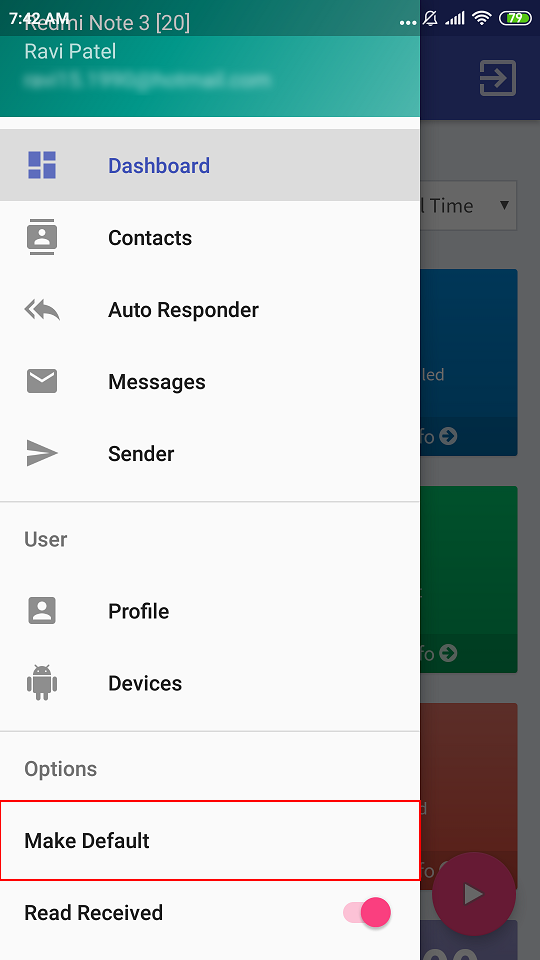
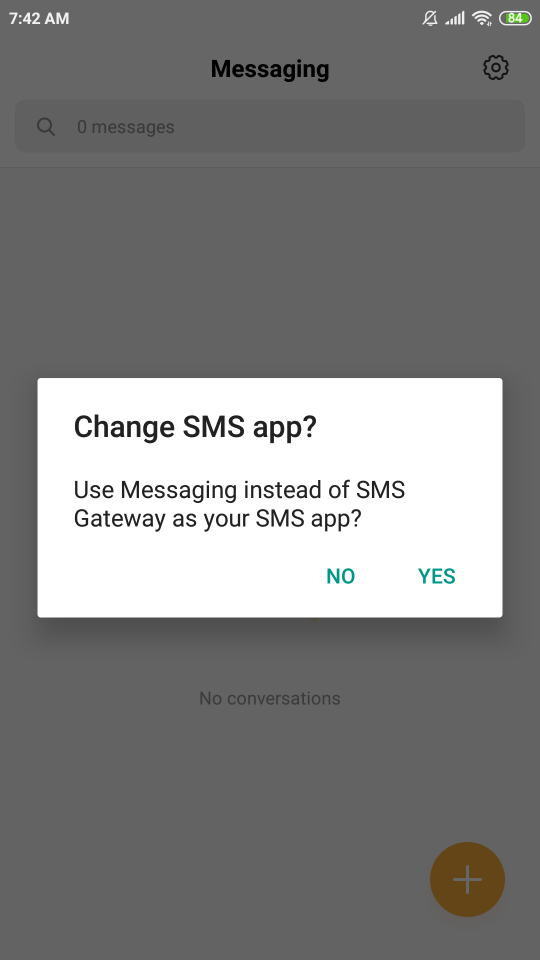
                <![CDATA[<p>You can avoid storing the sent messages on the phone by setting the SMS Gateway as default. Just open the navigation drawer on the app and click on "Make Default" as highlighted in the below screenshot.</p><p>Making the app default messaging app will prevent the storage of both sent and received messages so make sure you have the "Read Received" option turned on so you can see the received messages in the SMS Gateway app.</p><p><img src="https://support-hub--assets.s3.eu-west-2.amazonaws.com/assets/150/images/oyubzmGYIxGL3ByAj6DCvHWHbXYPWFgedKrUhMvV.png" alt="oyubzmGYIxGL3ByAj6DCvHWHbXYPWFgedKrUhMvV.png" style="width:50%;" /></p><h3>Unset app as the default app</h3><p><br /></p><p>If you won't revert the above changes then you can open your primary messaging app and it will prompt you to make it a default app. Just choose "Yes" and you will be able to store sent and received messages in your primary messaging app.</p><p><img src="https://support-hub--assets.s3.eu-west-2.amazonaws.com/assets/150/images/N4J9GQG2KNg5YRqOgHqEeMMHggpLQJX90xTmqueS.png" alt="N4J9GQG2KNg5YRqOgHqEeMMHggpLQJX90xTmqueS.png" style="width:50%;" /><br /></p><p><br /></p>]]>
            </summary>
                                    <updated>2020-08-21T06:09:36+00:00</updated>
        </entry>
            <entry>
            <title><![CDATA[How to install it using Cpanel?]]></title>
            <link rel="alternate" href="https://rbsoft.support-hub.io/articles/how-to-install-it-using-cpanel-1950" />
            <id>https://rbsoft.support-hub.io/1950</id>
            <author>
                <name><![CDATA[Ravi Patel]]></name>
            </author>
            <summary type="html">
                <![CDATA[<p>You can follow the below steps to install it using cPanel. <br /></p><p>
</p><p>1. Get your Firebase Service Account JSON by following the below guide.
</p><p><a href="https://smsgateway.rbsoft.org/docs/downloading_firebase_service_account_json.htm" target="_blank" rel="noreferrer noopener">https://smsgateway.rbsoft.org/docs/downloading_firebase_service_account_json.htm</a></p><p>2. Download the latest package zip file from CodeCanyon. You will find "SMS-Gateway.zip" in the "Stable" folder after you extract the zip file you downloaded. Upload it into the "htdocs" or "public_html" folder using file manager in cPanel.</p><p>
</p><p>
</p><p>3. After the upload completes, click on your zip file and extract the file using the toolbar option in cPanel file manager.
</p><p>
</p><p>4. Now you have to create a database and database user which will be used as "Database Name" and "Database User" during the installation process. Follow below video tutorial until 4:30. You can skip the rest of the video.<br /></p><p>
</p><p><a href="https://youtu.be/0tdFBqDsOqQ" target="_blank" rel="noreferrer noopener">https://youtu.be/0tdFBqDsOqQ</a>
</p><p>
</p><p>5. You will also need a Purchase Code to install it. You can get it by following the below guide.
</p><p>
</p><p><a href="https://help.market.envato.com/hc/en-us/articles/202822600-Where-Is-My-Purchase-Code" target="_blank" rel="noreferrer noopener">https://help.market.envato.com/hc/en-us/articles/202822600-Where-Is-My-Purchase-Code</a>
</p><p>
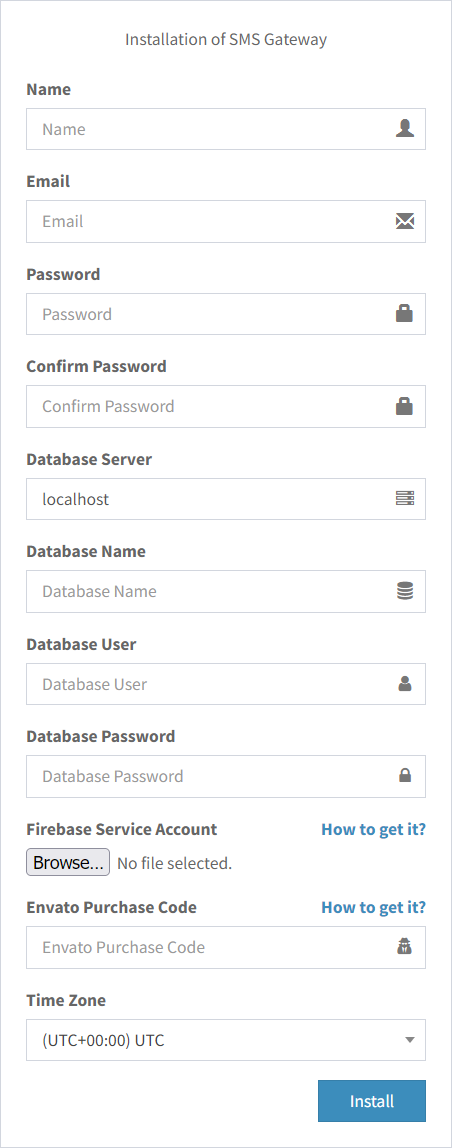
</p><p>6. Now navigate to your domain using your browser, and you will see the following form. Just enter all the details we collected so far, your Name, email you want to use for Admin account and Admin account password. Press Install and it will be installed. Database Server field should be "localhost" or "127.0.0.1" without quotes in most cases.<br /><img src="https://support-hub--assets.s3.eu-west-2.amazonaws.com/assets/150/images/oxu1bCf2NQ0DpNUI6fzLrh5BgxJOv6BELBcUfJMO.png" style="width:50%;" alt="oxu1bCf2NQ0DpNUI6fzLrh5BgxJOv6BELBcUfJMO.png" /></p><p>
</p><p>6. It is recommended to set up a cron job for certain functionality to work. Follow the below tutorial for that.
</p><p>
</p><p><a href="https://smsgateway.rbsoft.org/docs/setting_up_the_cron_job_1.htm" target="_blank" rel="noreferrer noopener">https://smsgateway.rbsoft.org/docs/setting_up_the_cron_job_1.htm</a><a href="https://smsgateway.rbsoft.org/docs/setting_up_the_cron_job_1.htm" target="_blank" rel="noreferrer noopener"></a></p><p>7. You can use following APK with your server.</p><p><a href="https://rbsoft.org/downloads/sms-gateway/sms-gateway.apk" target="_blank" rel="noreferrer noopener">https://rbsoft.org/downloads/sms-gateway/sms-gateway.apk</a></p><p>It is recommended that you create your own APK as shown in the below guide.  That APK will be tied to your server, and you won't have to insert the Server URL while using it.</p><p><a href="https://smsgateway.rbsoft.org/docs/create_customized_android_application.htm" target="_blank" rel="noreferrer noopener">https://smsgateway.rbsoft.org/docs/create_customized_android_application.htm</a></p>]]>
            </summary>
                                    <updated>2026-03-14T05:46:55+00:00</updated>
        </entry>
            <entry>
            <title><![CDATA[How to resolve INVALID_KEY error while sending messages?]]></title>
            <link rel="alternate" href="https://rbsoft.support-hub.io/articles/how-to-resolve-invalid-key-error-while-sending-messages-2582" />
            <id>https://rbsoft.support-hub.io/2582</id>
            <author>
                <name><![CDATA[Ravi Patel]]></name>
            </author>
            <summary type="html">
                <![CDATA[<p>This usually means you used the wrong Firebase Server Key while installing SMS Gateway on your server. You can get correct Firebase Server Key by following <a href="https://smsgateway.rbsoft.org/docs/getting_server_key_and_sender_id_from_firebase.htm#" target="_blank" rel="noreferrer noopener">this tutorial</a>.</p><p>After you get the correct Firebase Server Key, you can correct it in config.php, and it should start working.<br /></p>]]>
            </summary>
                                    <updated>2021-07-31T05:44:06+00:00</updated>
        </entry>
            <entry>
            <title><![CDATA[How to add device to other user's account using Admin account?]]></title>
            <link rel="alternate" href="https://rbsoft.support-hub.io/articles/how-to-add-device-to-normal-users-account-using-admin-accout-2592" />
            <id>https://rbsoft.support-hub.io/2592</id>
            <author>
                <name><![CDATA[Ravi Patel]]></name>
            </author>
            <summary type="html">
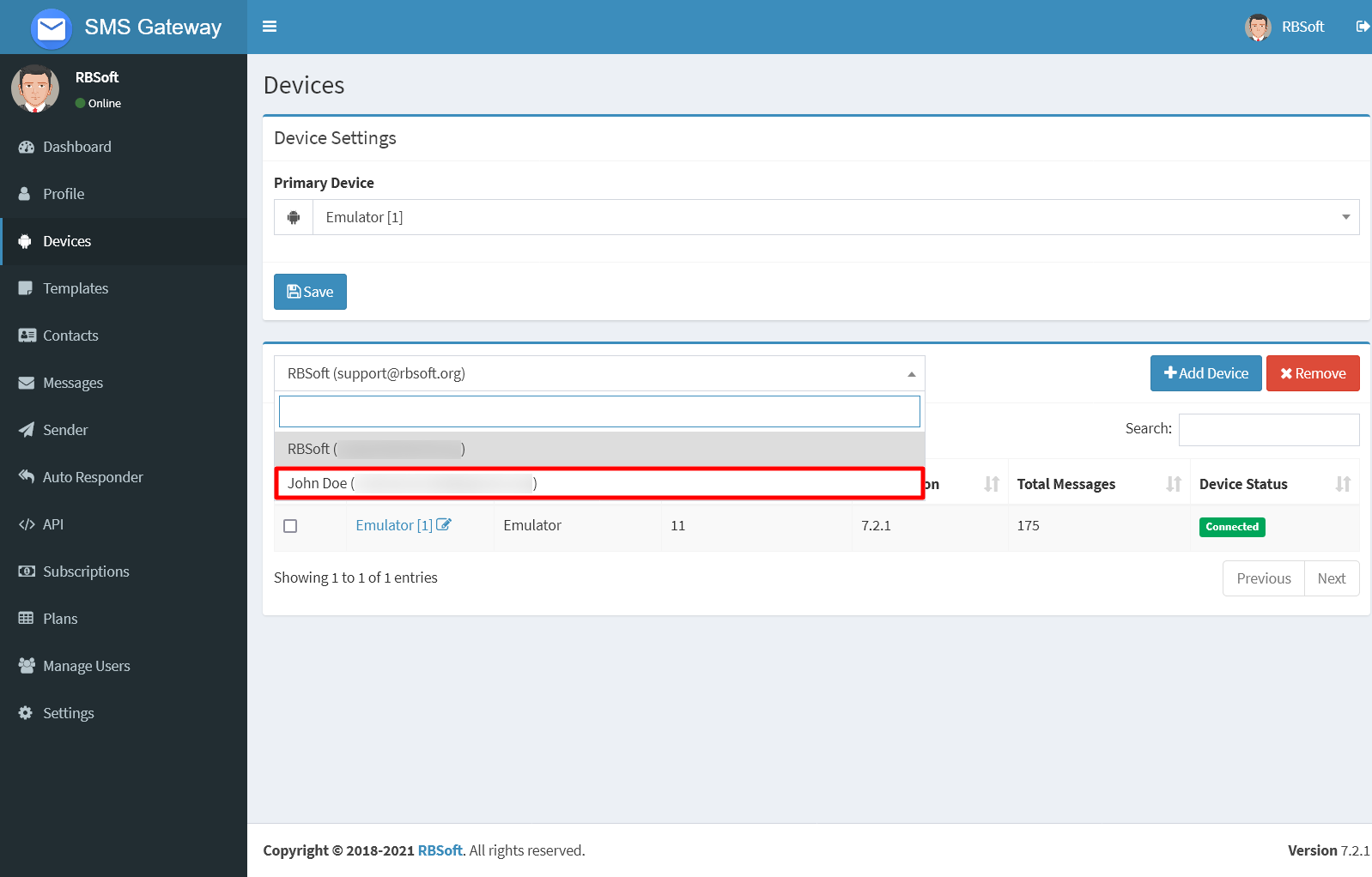
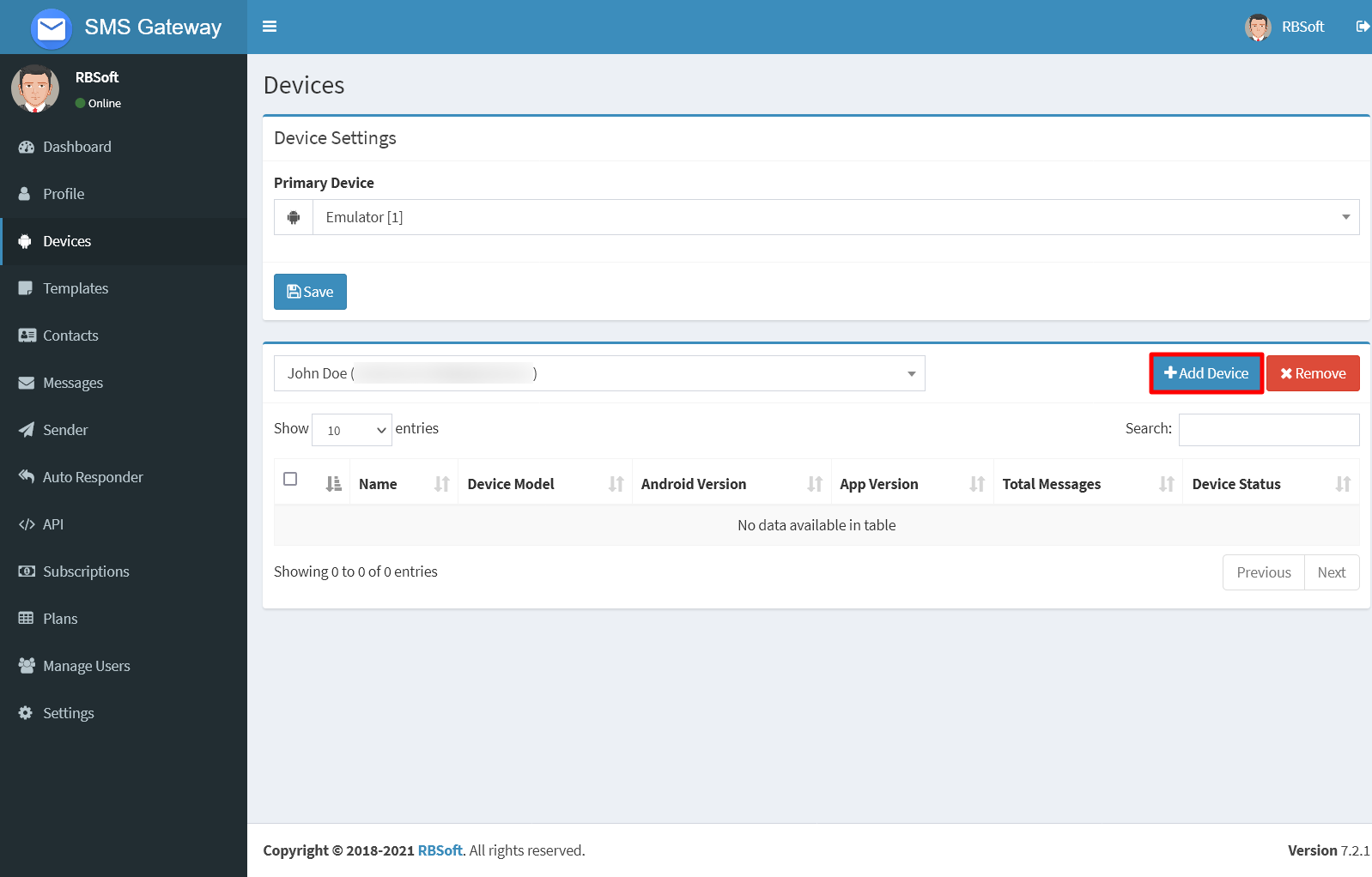
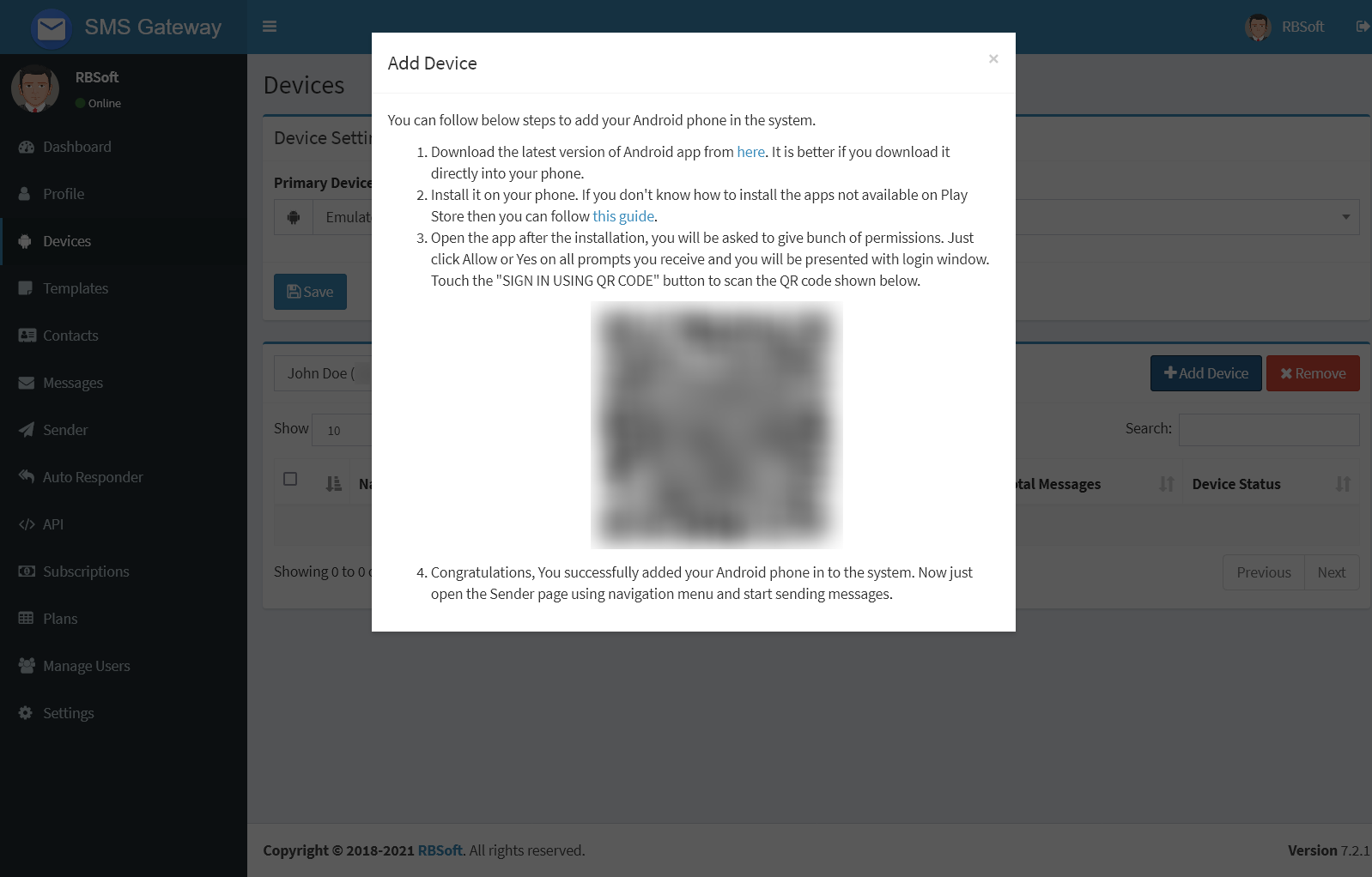
                <![CDATA[You can add a device into another user's account from the Devices page. Just open it and search for user in the user selection list as shown below.<p><img src="https://support-hub--assets.s3.eu-west-2.amazonaws.com/assets/150/images/e8Gzrm8tpM4uatJstovfpgorRZPMvak6z5NOKScs.png" alt="e8Gzrm8tpM4uatJstovfpgorRZPMvak6z5NOKScs.png" /></p><p>After selecting the user, just click on Add Device button as shown below.</p><p><img src="https://support-hub--assets.s3.eu-west-2.amazonaws.com/assets/150/images/JJa7w4sCg65pMOwDy5bwTzs9LKM4K1Xowr2YkeBK.png" alt="JJa7w4sCg65pMOwDy5bwTzs9LKM4K1Xowr2YkeBK.png" /><br /></p><p>You will be presented with the following dialog, just follow the instructions in it and the device will be added to that user's account.</p><p><img src="https://support-hub--assets.s3.eu-west-2.amazonaws.com/assets/150/images/lBZS8JijP8tcTAW9nHjC7uTJHVz6exmBJ3T0ko1z.png" alt="lBZS8JijP8tcTAW9nHjC7uTJHVz6exmBJ3T0ko1z.png" /><br /></p><p>You will be able to delete this device anytime from this user's account by selecting it and pressing Remove. Furthermore, you can also disconnect the device from this user's account and assign it to another by signing out from the application and following the above steps to add it to the other user's account.<br /></p>]]>
            </summary>
                                    <updated>2021-10-02T13:04:07+00:00</updated>
        </entry>
            <entry>
            <title><![CDATA[What should be the ideal configuration for smooth operation of the app?]]></title>
            <link rel="alternate" href="https://rbsoft.support-hub.io/articles/idle-delay-for-smooth-operation-of-the-app-2610" />
            <id>https://rbsoft.support-hub.io/2610</id>
            <author>
                <name><![CDATA[Ravi Patel]]></name>
            </author>
            <summary type="html">
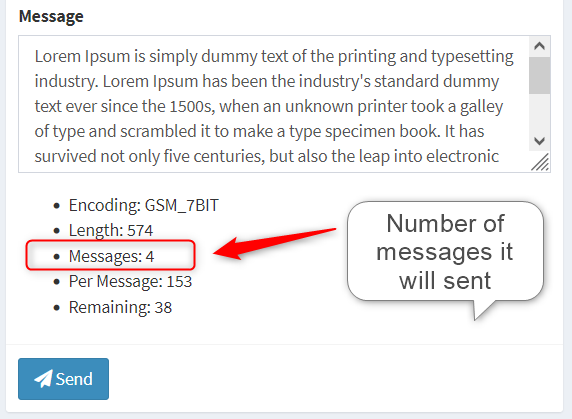
                <![CDATA[<p>Some network operators don't like automated messages, in that case you can set variable delay. Just type "8-20" as delay on Profile page and click Save. It will select a random delay between 8 and 20 seconds for each message.<br /><br /></p><h3>After v9.0</h3><p>You can turn on "Send next message in campaign only after current message is processed by network operator" option on Profile page for a better experience. If you didn't enable "Request a delivery report for each message you send (Only SMS)" option on Profile page, you can set delay to 0 to send messages faster when the previously mentioned option is enabled, but it is recommended to keep 2 sec delay for SMS if you have delivery reports enabled. If you still face issue where messages are getting Failed status or stuck in Queued status for a long time, then try to increase the delay between messages.<br /></p><h3>Before v9.0<br /></h3><p>It is recommended to keep 2 sec minimum delay for SMS and 4 sec for MMS. For SMS if you are seeing more than 1 message while sending as shown in following screenshot then just multiply number of messages with 2 and set that as a min delay. So for 4 messages as shown in the screenshot, it is a good idea to set 8 (2 x 4) sec minimum delay.<br /><br /><img style="width:572px;" src="https://support-hub--assets.s3.eu-west-2.amazonaws.com/assets/150/images/P8kBTAFt7zZT4jfYPxzWpe3D7AkZEyBlzCBL10k3.png" alt="P8kBTAFt7zZT4jfYPxzWpe3D7AkZEyBlzCBL10k3.png" /><br /></p>]]>
            </summary>
                                    <updated>2024-04-26T12:42:59+00:00</updated>
        </entry>
            <entry>
            <title><![CDATA[How can I prevent SIM block from your carrier?]]></title>
            <link rel="alternate" href="https://rbsoft.support-hub.io/articles/how-can-i-prevent-sim-block-from-your-carrier-2699" />
            <id>https://rbsoft.support-hub.io/2699</id>
            <author>
                <name><![CDATA[Ravi Patel]]></name>
            </author>
            <summary type="html">
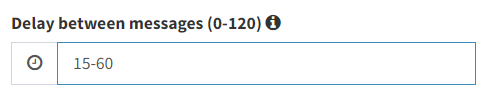
                <![CDATA[<p>There are multiple ways to prevent your network operator from blocking the SIM. When employed together, it can lengthen the time it takes for eventual SIM block or can prevent it.</p><p>1. Set some ranged delay like "15-30" between messages. You can do this from the profile page. It will select a random delay from the range for each message. The greater the difference between the minimum and maximum value, the better.</p><p><img src="https://support-hub--assets.s3.eu-west-2.amazonaws.com/assets/150/images/kAJLANd56maJZxwCbAMTxo5wjkjV1HE6mbsUi9lv.png" alt="kAJLANd56maJZxwCbAMTxo5wjkjV1HE6mbsUi9lv.png" style="width:50%;" /></p><p>2. Use spintax feature available in v9.2 or above to randomize the message. Below is the example of spintax.</p><pre>{Hi|Hey|Hello},<br /><br />How are you?<br /><br />{Best|Kind} Regards,<br />Ravi</pre><p>In the above message, it will choose Hi, Hello, or Hey randomly for each message. This helps greatly to randomize the text.</p><p>3. Add random number using new feature added in v9.2 or above for more randomization. You can do this by adding "%random-10%" without quotes in your message. You can change 10 to any other value. It determines the length of the random number.<br /></p>]]>
            </summary>
                                    <updated>2023-01-18T05:17:53+00:00</updated>
        </entry>
            <entry>
            <title><![CDATA[How to schedule a cron job on Windows PC?]]></title>
            <link rel="alternate" href="https://rbsoft.support-hub.io/articles/how-to-schedule-a-cron-job-on-windows-pc-2722" />
            <id>https://rbsoft.support-hub.io/2722</id>
            <author>
                <name><![CDATA[Ravi Patel]]></name>
            </author>
            <summary type="html">
                <![CDATA[<p>You can use scheduled tasks to achieve this.<br /><br /><a href="https://stackoverflow.com/a/29010335/1273550" target="_blank" rel="noreferrer noopener">https://stackoverflow.com/a/29010335/1273550</a></p>]]>
            </summary>
                                    <updated>2023-05-24T09:49:38+00:00</updated>
        </entry>
            <entry>
            <title><![CDATA[How can I do multistep USSD request?]]></title>
            <link rel="alternate" href="https://rbsoft.support-hub.io/articles/how-can-i-do-multistep-ussd-request-2723" />
            <id>https://rbsoft.support-hub.io/2723</id>
            <author>
                <name><![CDATA[Ravi Patel]]></name>
            </author>
            <summary type="html">
                <![CDATA[<p>First, make sure you set USSD delay to 0 on profile page. Usually, when you initiate the first USSD request, it waits for 30 seconds for the next input. If you make another request in this time frame, then it will consider it as an input to the previous request. Although, it will work only if your input to previous request is only 1 digit long. It is one of the limitation of USSD function provided by the Android SDK. It doesn't support taking input longer than 1 digit. This can't be overcome by the app, because the app relies on the Android SDK to perform this.</p><p>To overcome this limitation, you can also convert the multistep code to single step. For example, if you have a USSD code like *786# and you want to send 1 as reply to it, then you can use *786*1# to see if it works. This works for me, so it may work for you too. You can also do this for more than one input. For example, if you have a USSD code like *141# and you want to send 4 as the first input and 2 as the second, then you can use *141*4*2# to see if it works. This may work differently for your USSD provider. You can ask your USSD provider to see if this code can be done in a single step.</p><p><br /></p><p><br /></p><p><br /></p><p><br /></p>]]>
            </summary>
                                    <updated>2023-05-25T05:03:50+00:00</updated>
        </entry>
            <entry>
            <title><![CDATA[I am getting error "MISSING_INSTANCEID_SERVICE" when trying to login to mobile app. What should I do?]]></title>
            <link rel="alternate" href="https://rbsoft.support-hub.io/articles/i-am-getting-error-missing-instanceid-service-when-trying-to-login-to-mobile-app-what-should-i-do-2724" />
            <id>https://rbsoft.support-hub.io/2724</id>
            <author>
                <name><![CDATA[Ravi Patel]]></name>
            </author>
            <summary type="html">
                <![CDATA[<p>It means your device doesn't have Google Play Services installed. It requires Google Play Services for it to work. Usually, if you have the Google Play Store on the phone, then you should have play services.<br /></p>]]>
            </summary>
                                    <updated>2023-06-06T13:15:55+00:00</updated>
        </entry>
            <entry>
            <title><![CDATA[I am getting "INVALID_PARAMETERS" or "Invalid response from the server" issue when you I try to login to app. What should I do?]]></title>
            <link rel="alternate" href="https://rbsoft.support-hub.io/articles/i-am-getting-invalid-parameters-or-invalid-response-from-the-server-issue-when-you-i-try-to-login-to-app-what-should-i-do-2730" />
            <id>https://rbsoft.support-hub.io/2730</id>
            <author>
                <name><![CDATA[Ravi Patel]]></name>
            </author>
            <summary type="html">
                <![CDATA[<p>If you are using web panel v9.4 or above, make sure your Android app version is also v9.4 or above. From v9.4 it uses newer version of Firebase API, so if you did fresh installation of latest version it won't work with older APK. You can download the latest version of APK from <a href="https://rbsoft.org/downloads/sms-gateway/sms-gateway.apk" target="_blank" rel="noreferrer noopener">here</a>. This APK is generalized with Server URL field and don't use Firebase. If you want to use Firebase, you have to customize it using build server, as shown <a href="https://smsgateway.rbsoft.org/docs/create_customized_android_application.htm" target="_blank" rel="noreferrer noopener">here</a>.</p><p>If you are using web panel v9.3.1 or below, make sure your Android app version is also v9.3.1 or below. You can create APK for older version using build server as shown <a href="https://smsgateway.rbsoft.org/docs/create_customized_android_application.htm" target="_blank" rel="noreferrer noopener">here</a>. You don't have to get the "google-services.json" to create an older version of APK. It is recommended to upgrade web panel to latest version because Google is going to discontinue older version of Firebase API on June 2024. That can prevent an older version from working after that.<br /></p><p><br /><br /></p>]]>
            </summary>
                                    <updated>2023-09-02T05:51:05+00:00</updated>
        </entry>
            <entry>
            <title><![CDATA[My message have Sent status but It isn't delivered receiver.]]></title>
            <link rel="alternate" href="https://rbsoft.support-hub.io/articles/my-message-have-sent-status-but-it-isnt-delivered-receiver-2731" />
            <id>https://rbsoft.support-hub.io/2731</id>
            <author>
                <name><![CDATA[Ravi Patel]]></name>
            </author>
            <summary type="html">
                <![CDATA[<p>You can try turning on Request for Delivery Reports from profile page to see if it works. This will only request the delivery report. It is your network operator's decision to fulfill it or not. If it doesn't help try to increase the delay between messages from profile page.</p><p>Sent, Failed and Delivered status are given by your network operator. If you can send SMS or MMS normally, then you should be able to do it with this app, because all SMS related app on the phone uses the same system function to send messages. Make sure your SIM plan allows you to send SMS or MMS. Default messaging allows you to send RCS messages too, so make sure you don't confuse it with SMS or MMS.<br /></p>]]>
            </summary>
                                    <updated>2026-02-18T05:17:02+00:00</updated>
        </entry>
            <entry>
            <title><![CDATA[I am getting "Deceptive site ahead" warning after I installed the web app. What should I do?]]></title>
            <link rel="alternate" href="https://rbsoft.support-hub.io/articles/i-am-getting-deceptive-site-ahead-warning-after-i-installed-the-web-app-what-should-i-do-2732" />
            <id>https://rbsoft.support-hub.io/2732</id>
            <author>
                <name><![CDATA[Ravi Patel]]></name>
            </author>
            <summary type="html">
                <![CDATA[<p>You have to apply for review of the domain or subdomain using Google Search Console as shown in below video.<br /><br /><a href="https://youtu.be/sfuaxxDYbIM" target="_blank" rel="noreferrer noopener">https://youtu.be/sfuaxxDYbIM</a><br /><br />You can include the link to privacy policy in your review and also mention that you are using the self-hosted script bought from CodeCanyon and provide the link to the product page. Privacy policy text is included with the web app. You can find it in root folder where you installed it. Just change the company name, email address and date in privacy policy before you submit the review. It should remove the warning. <br /></p><p><a href="https://codecanyon.net/item/sms-gateway/21419519" target="_blank" rel="noreferrer noopener">https://codecanyon.net/item/sms-gateway/21419519</a></p>]]>
            </summary>
                                    <updated>2023-11-25T05:40:59+00:00</updated>
        </entry>
            <entry>
            <title><![CDATA[I received a message but it doesn't show up in SMS Gateway. What should I do?]]></title>
            <link rel="alternate" href="https://rbsoft.support-hub.io/articles/i-received-a-message-but-it-doesnt-show-up-in-sms-gateway-what-should-i-do-2737" />
            <id>https://rbsoft.support-hub.io/2737</id>
            <author>
                <name><![CDATA[Ravi Patel]]></name>
            </author>
            <summary type="html">
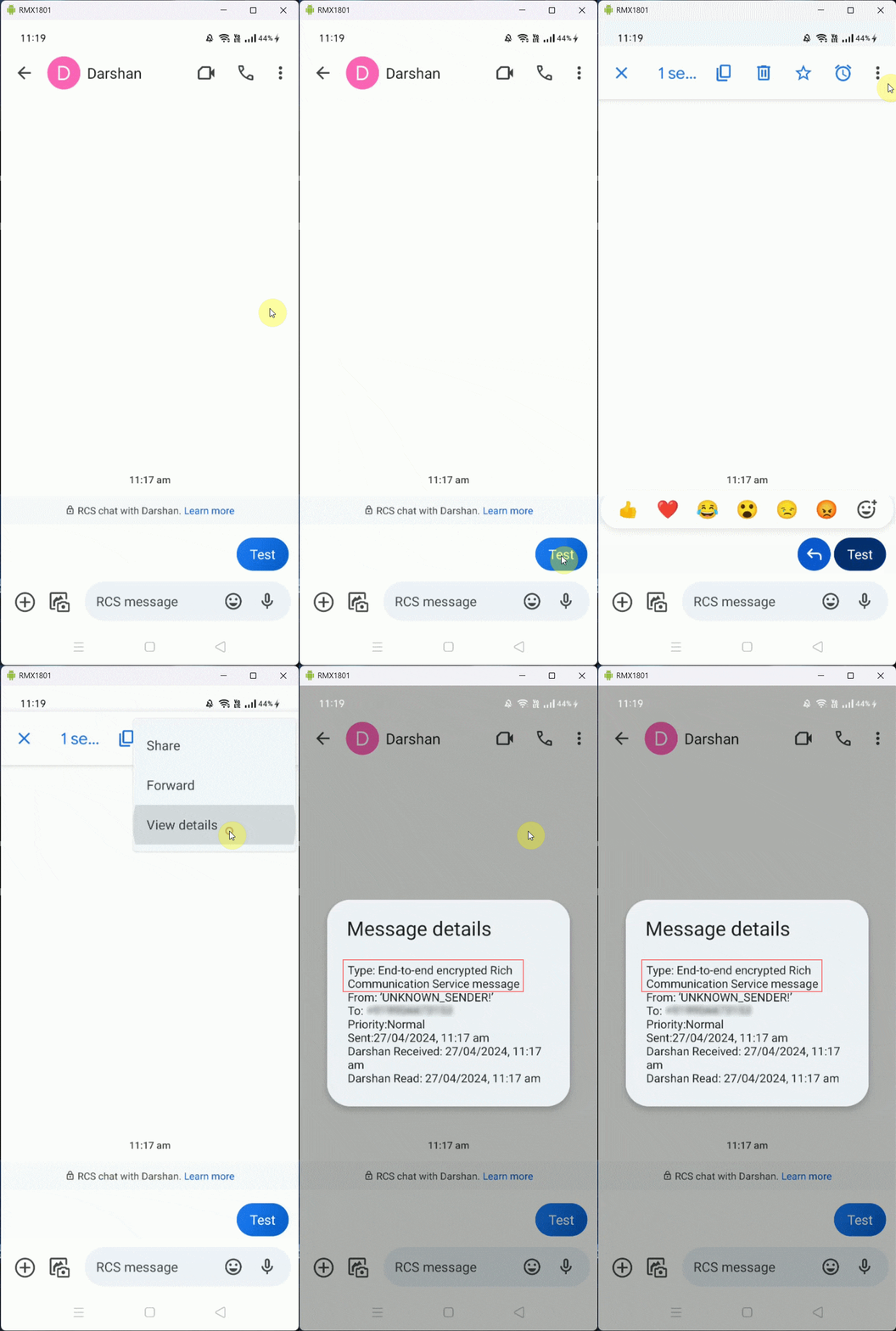
                <![CDATA[<p>Please make sure the message you received is SMS. SMS Gateway app can only read SMS messages right now, so any other type of messages won't show up in the app. You can check the message type as shown below.</p><p><img src="https://support-hub--assets.s3.eu-west-2.amazonaws.com/assets/150/images/49j5Dd92IR3N3R1Cj5wDJalIuBifcnNZCGbYpSV2.gif" alt="49j5Dd92IR3N3R1Cj5wDJalIuBifcnNZCGbYpSV2.gif" style="width:25%;" /><br /></p><p> Turn off RCS. If both Sender and Receiver have RCS turned on and receiver uses messaging app to reply to your SMS message. It will be most likely RCS message which this app can't read.</p><p>It can be an issue with sync failure. In that case, the app will try to sync it again after some time or with the next message, whichever happens earlier.<br /></p>]]>
            </summary>
                                    <updated>2024-04-27T09:58:32+00:00</updated>
        </entry>
            <entry>
            <title><![CDATA[How to fix "SenderId mismatch" error when sending messages?]]></title>
            <link rel="alternate" href="https://rbsoft.support-hub.io/articles/how-to-fix-senderid-mismatch-error-when-sending-messages-2738" />
            <id>https://rbsoft.support-hub.io/2738</id>
            <author>
                <name><![CDATA[Ravi Patel]]></name>
            </author>
            <summary type="html">
                <![CDATA[<p>Make sure you got Firebase Service Account JSON for web panel and google-services.json for Android app from same Firebase account. You can get the Firebase service account JSON from same account you got your google-services.json and upload it in Settings→Features.<br /><br /><a href="https://smsgateway.rbsoft.org/docs/downloading_firebase_service_account_json.htm" target="_blank" rel="noreferrer noopener">https://smsgateway.rbsoft.org/docs/downloading_firebase_service_account_json.htm</a></p><p>Or you can get the new google-services.json from same account where you got your Firebase service account JSON and create new customized APK.<br /></p><p><a href="https://smsgateway.rbsoft.org/docs/create_customized_android_application.htm" target="_blank" rel="noreferrer noopener">https://smsgateway.rbsoft.org/docs/create_customized_android_application.htm</a><a href="https://smsgateway.rbsoft.org/docs/create_customized_android_application.htm" target="_blank" rel="noreferrer noopener"></a></p><p>Or you can use general APK from below link and use it. General APK doesn't use Firebase, so you won't get this issue.</p><p><a href="https://rbsoft.org/downloads/sms-gateway/sms-gateway.apk" target="_blank" rel="noreferrer noopener">https://rbsoft.org/downloads/sms-gateway/sms-gateway.apk</a><br /><br />If you are using web panel or android app version 9.4 or below then you can follow below guide to solve this issue.</p><p><a href="https://rbsoft.support-hub.io/articles/how-to-resolve-invalid-sender-error-while-logging-in-to-sms-gateway-app" target="_blank" rel="noreferrer noopener">https://rbsoft.support-hub.io/articles/how-to-resolve-invalid-sender-error-while-logging-in-to-sms-gateway-app</a></p><p><br /></p>]]>
            </summary>
                                    <updated>2024-08-16T10:07:42+00:00</updated>
        </entry>
            <entry>
            <title><![CDATA[I am getting "301 Moved Permanently" error when sending messages. How to fix it?]]></title>
            <link rel="alternate" href="https://rbsoft.support-hub.io/articles/i-am-getting-301-moved-permanently-error-when-sending-messages-how-to-fix-it-2739" />
            <id>https://rbsoft.support-hub.io/2739</id>
            <author>
                <name><![CDATA[Ravi Patel]]></name>
            </author>
            <summary type="html">
                <![CDATA[<p>If you are using SMS Gateway version less than 9.4.x then it can happen because older versions uses Legacy Firebase API which is discontinued by Google. Please upgrade SMS Gateway to latest version to resolve this issue.<br /><br />You can upgrade to latest version by downloading latest zip file from your CodeCanyon account. Just follow upgrade instructions inside it to upgrade your web app and android app.</p><p>If after the upgrade, you can't log in to the web app, then just clear your browser cookies and it should work.<br /></p>]]>
            </summary>
                                    <updated>2024-09-04T12:53:23+00:00</updated>
        </entry>
            <entry>
            <title><![CDATA[I am getting "App blocked to protect your device" while installing the app? Why is that and how to solve it?]]></title>
            <link rel="alternate" href="https://rbsoft.support-hub.io/articles/i-am-getting-app-blocked-to-protect-your-device-while-installing-the-app-why-is-that-and-how-to-solve-it-2743" />
            <id>https://rbsoft.support-hub.io/2743</id>
            <author>
                <name><![CDATA[Ravi Patel]]></name>
            </author>
            <summary type="html">
                <![CDATA[<p>
    Google Play Protect may block the app because it is not installed from Play Store and requests RECEIVE_SMS permission. You can read more about it <a href="https://developers.google.com/android/play-protect/warning-dev-guidance" target="_blank" rel="noreferrer noopener">here</a>.
    This does <strong>not</strong> mean the app is harmful — it's just a precaution by Google.
  </p>

  <h2>📍 Scenario 1: App is Completely Blocked (No “Install Anyway” Button)</h2>
  <p>
    If the app is permanently blocked in your region or device, follow these steps to disable Play Protect temporarily:
  </p>


  <h3>🔧 Steps to Disable Google Play Protect</h3>
  <ul>
    <li>Open the <strong>Google Play Store</strong> app.</li>
    <li>Tap your <strong>profile icon</strong> (top right corner).</li>
    <li>Select <strong>Play Protect</strong> → then tap the <strong>Settings</strong> icon (gear).</li>
    <li>Turn <strong>off</strong> both options:
      <ul>
        <li>“Scan apps with Play Protect”</li>
        <li>“Improve harmful app detection”</li>
      </ul>
    </li>
    <li>Now install the app again.</li>
    <li>Once done, you can re-enable Play Protect for continued protection.</li>
  </ul>

  <h2>📍 Scenario 2: You See “Install Anyway” Option</h2>
  <p>If your device shows the “Install anyway” option, follow these steps:</p>

  <h3>📥 Steps to Proceed</h3>
  <ul>
    <li>On the warning screen, tap <strong>"Details"</strong>.</li>
    <li>Then tap <strong>"Install anyway"</strong>.</li>
    <li>Proceed with the installation.</li>
  </ul>

  <p><em>Note: If you don’t see the button, follow the method above to disable Play Protect temporarily.</em></p>]]>
            </summary>
                                    <updated>2025-04-12T12:00:31+00:00</updated>
        </entry>
    </feed>